loop-me interviews you about a job you do again and again, and writes it down as a spec an agent could build. Its description reads: "Grill me about specs for the workflows I want to build, within this workspace."
It runs a grilling session "whose only output is workflow specs." On this site we call each one loop-me's workflow spec.
It looks at your life as loops. A loop is "a recurring pattern in the user's life: their career, their week, their morning, a single repeated activity." It also proposes loops you haven't noticed.
When to use it
You keep doing the same job by hand, such as sorting new Issues every morning, and want to hand it off.
You don't know yet what to hand off. Start it with no argument and it goes looking: its hint is "A workflow to design, or nothing to go find one".
The spec will take more than one sitting. Matt's README says it works "over multiple sessions".
When not to use it
You want to sharpen a one-off plan or design. Use grill-me, "a relentless interview to sharpen a plan or design." It saves nothing. loop-me only writes loop-me's workflow specs, so a plan for one feature is the wrong job for it.
You want the job running today. loop-me writes the spec and stops. Building it, and running it on a schedule, is a separate step.
What it needs to start
A folder to work in. The current directory is its workspace.
You, typing /loop-me. It is marked disable-model-invocation: true, so the agent never starts it on its own.
Your answers. When NOTES.md is empty or thin, it first interviews you about your tools and channels.
What it creates
workflows/*.md: one spec per loop, and "the source of truth." It creates, edits and deletes these as the grilling settles things.
NOTES.md: notes on your world, the tools you use, the channels you process and your own words for both.
A spec is done "when an implementer agent could build it without asking a single question."
It has four words, used only when a spec needs them:
Trigger: what fires each run, an event or a schedule.
Checkpoint: a point where you verify or decide.
Push right: put the checkpoint as late as it will go.
Brief: the short summary a checkpoint shows you.
It mandates nothing: a spec "needs no AI, no checkpoint, and no schedule unless the grilling shows it does."
Going deeper
5 min read · Going deeper not read
Why it exists
Matt announced loop-me on 2026-06-24 as a "New in-progress skill". In his words, it "Interviews you about your work and finds opportunities for delegating your day-to-day work to AI".
It sits in his in-progress bucket, which he labels "Beta". That bucket's README says its Skills "can change or disappear without warning", and that they "get no docs pages". The README sums it up in one line: "Grill yourself into implementable workflow specs over multiple sessions, using the current directory as a stateful workspace."
His post says "to AI". The SKILL.md at the pin commit a496f55 (2026-10-29) is four months newer, and it decides: as the short part says, a spec needs no AI unless the grilling shows it does.
How it works underneath
loop-me is grilling with a narrow target. It uses "the grilling discipline (relentless, a round of questions at a time, a recommended answer attached to each)". What changes is the finish line the short part gives: a spec an implementer agent could build without a question.
The idea it rests on is that repeated work is predictable. In the SKILL.md's words, "Picturing a life as loops within loops reveals how predictable its activities really are, which is what makes them worth ."
From snapshot/skills/loop-me/SKILL.md, line 12: “A loop is a recurring pattern in the user's life: their career, their week, their morning, a single repeated activity.”
The SKILL.md also puts your review time first. You are "asked once, late, with everything prepared". And "Speed of review is imperative."
Three other things nearby also repeat work. Together with loop-me, that makes four. Only loop-me's whole job is writing a spec. The other three run something.
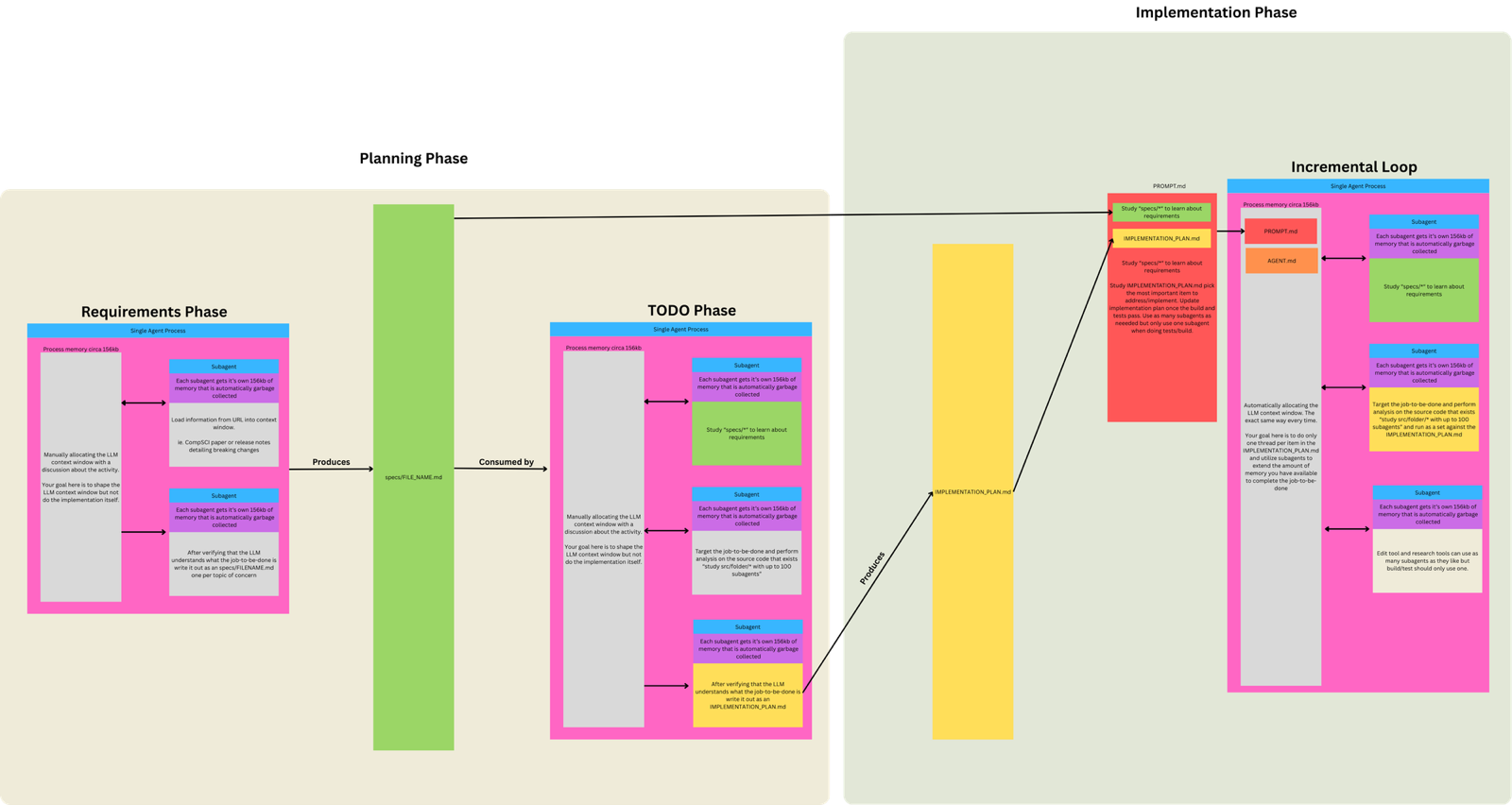
The Ralph loop. Geoffrey Huntley wrote it up on 2025-07-14: "In its purest form, Ralph is a Bash loop." That form is just while :; do cat PROMPT.md | claude-code ; done. Matt's guide (updated 2026-01-08) puts it this way: "You run the same prompt repeatedly. The AI picks its own tasks from a PRD." A Ralph loop builds code. loop-me builds nothing.
Claude Code's /loop. It lets Claude "re-run a prompt automatically on an interval within a Claude Code session." The docs say to use it "for quick polling during a session."
A cloud scheduled task. This is "a saved Claude Code configuration" that runs in the cloud. Such tasks suit work that is "unattended, repeatable, and tied to a clear outcome."
Geoffrey Huntley's own diagram of the Ralph loop, from his 2025-07-14 post. From ghuntley.com, 30 October 2026.
whole job is writing a spec
run something
loop-me
yes
no
The Ralph loop
no
yes
Claude Code's /loop
no
yes
A cloud scheduled task
no
yes
Only loop-me's whole job is writing a spec.
Anthropic's docs list example jobs for cloud scheduled tasks. In "Backlog maintenance", "a schedule trigger runs every weeknight in your repository". A finished spec could describe a job like that, or one that uses "no AI at all".
Where it goes wrong
"Spec done" is not "run done". Issue #657 (2026-07-24) proposed that loop-me defines when a spec is done, but not "the completion boundary for one run". Its body was drafted by an AI agent, as its label says. Without that boundary, it warns, a job can become "an unbounded retry loop or allow it to report success without a checkable result." It is a proposal, not a reported failure. The closing note calls it "a proposal from reading the skill rather than a run that went wrong", and no failing run was reported. That note says "This was generated by AI during triage", so it isn't Matt's word. The issue was closed as not planned on 2026-10-06. Claude Code's docs show why the question matters: a cloud run marked Succeeded only means "the session ended without Claude Code reporting a failure."
Claude Code's docs also show two traps when you put loops on a timer:
A /loop timer won't start loop-me. A scheduled /loop fire only runs Skills that Claude may start on its own. For Skills marked disable-model-invocation: true, the docs say they "reach Claude as plain text instead of executing". loop-me carries exactly that mark. It is an interview, so it needs you there anyway.
Building a job on the wrong loop./loop tasks "only fire while Claude Code is running and idle", and "Recurring tasks automatically expire 7 days after creation." A spec meant to run for months belongs on a cloud or Desktop scheduled task, or GitHub Actions; the docs' only /loop workaround is to cancel and recreate it before it expires.
Try it
In your practice project (set it up first with keeping-track's Try it step if you haven't), make a folder called loops/ and open your agent there. Type /loop-me a weekly summary of new booking Issues. Answer each round. When it writes a file in workflows/, read it as the builder would. Could an agent build it without asking a single question? If not, run /loop-me again and answer what is still open. If you like, also ask it how one run proves it finished, the question issue #657 proposed. Don't build or schedule the job yet.
From snapshot/skills/loop-me/SKILL.md, line 18: “Mandate nothing structural: a workflow needs no AI, no checkpoint, and no schedule unless the grilling shows it does.”
From snapshot/skills/loop-me/SKILL.md, line 32: “NOTES.md: raw notes on the user's world, the tools they use, the channels they process, and their own terminology for both.”
From snapshot/skills/ask-matt/SKILL.md, line 85: “the same relentless interview as /grill-with-docs, but stateless: it saves nothing locally and builds no GLOSSARY.md.”
From snapshot/skills/loop-me/SKILL.md, line 8: “Use the grilling discipline (relentless, a round of questions at a time, a recommended answer attached to each)”
From snapshot/skills/loop-me/SKILL.md, line 12: “Picturing a life as loops within loops reveals how predictable its activities really are, which is what makes them worth delegating.”