orca-cli is not one of Matt's Skills. Like orchestration, it comes with Orca, an app where each coding agent runs in its own worktree.
What it's for
It lets an agent drive the running Orca app through its orca command: Orca worktrees, terminals, repos, worktree comments and the built-in browser. In this Course its main job is the full handoff: give a piece of work to another agent in its own worktree, then stop. The new agent owns the work from then on.
When to use it
You say "hand off", "handoff", "handover" or "give this to another agent", and nobody needs to watch the new agent.
You want a new Orca worktree, or to read from or type into an Orca terminal. The Skill says to prefer it over raw git worktree commands whenever Orca's state is involved.
When not to use it
You want to supervise: wait for results, answer questions, or run Tasks in a set order. That's orchestration. Asking for a model or an effort level doesn't count as supervising.
The work leaves Orca, say for a colleague or a different agent tool: handoff writes a document the next agent reads.
Orca's state doesn't matter: the guide says to use plain shell tools.
What it needs to start
Orca running. If it isn't, the agent starts it with orca open.
The right command. On Linux outside Orca's terminals, the agent must use orca-ide: there, a bare orca starts the GNOME screen reader, which speaks aloud.
The real guide. The installed Skill file is only a stub. The agent runs orca skills get orca-cli to print the guide that matches the installed Orca.
A task brief: the prompt the new agent starts with.
What it creates
A new Orca worktree: a repo checkout that Orca tracks along with its terminals and browser tabs. For independent work it has no parent, and Orca starts it from the repo's default base.
An agent started in it, with your brief as its first prompt.
A short report: the new worktree's id and the agent's handle. The handoff is done once those are reported and the brief arrived. It doesn't wait for the new agent to finish.
Optionally, a worktree comment: the short status line on the workspace card.
Going deeper
5 min read · Going deeper not read
Why it exists
orca-cli has no place in Matt's buckets, because it isn't his. Orca's docs, published by Stably, Inc., list it among the skills "that agents install into their skill directories", and you install it from Orca's own repo, stablyai/orca.
Two problems shaped it, both in its authors' own dated words.
Guides that go stale. In a pull request opened on 2026-07-13, an Orca developer wrote: "Today, globally installed skills are frozen copies, so their command guidance can drift from the Orca binary they control." The fix: "have each stub request the guide from the exact binary it will use."
Handoff wording that needed one meaning. A pull request merged on 2026-06-29 made Orca "classify hand off/handoff/handover/another-agent wording as full ownership transfer unless supervision is explicit".
How it works underneath
A stub that asks the app. The file you install is a "hybrid discovery stub". Orca's docs describe it as a short file that tells the agent when to engage Orca and how to load the full guide from the running CLI. Their reason: "Command flags live in the binary so they cannot drift from the app version." The change landed for orca-cli first, in a pull request merged on 2026-07-20. It cut the installed file from 331 lines to 78 (the pull request also says 73 once), and the full guide stayed inside the orca program. That's why the stub's first job is to pick the right program, and its second is to run orca skills get orca-cli. The stub pinned for this Course is shorter still: 47 lines.
From snapshot/skills/orca-cli/orca-guide.md, line 31: “Treat requests phrased as "hand off", "handoff", "handover", "give this to another agent", "give this to another worktree", "another agent", or "another worktree" as full handoffs unless the user explicitly asks to supervise, monitor, wait for results, track completion, coordinate a DAG, use decision gates, or manage ask/reply.”
When a handoff counts as done. Orca's guide counts a handoff as done "when the new worktree id and agent handle have been reported and the prompt was delivered". For a new launch, that means its prompt.outcome is journaled or handed-to-terminal. For an agent that was already running, the send receipt reported accepted: true.
A real example
Before the stub shipped, Orca's developer tested it on real agents. That same 2026-07-20 pull request records the run. Claude Code and Codex each got the new stub and a small read-only task in a demo project.
Claude loaded it through its Skill tool, as Skill(orca-cli).
Both treated the file as a discovery stub, not a full command guide.
Both picked plain orca on macOS, the right program there.
Both ran orca skills get orca-cli before any status, worktree or terminal command.
Neither invented a subcommand from memory. The verdict: "pass".
The record is honest about its limits. It didn't measure the old-binary failure path, the token cost, or the Linux, WSL and SSH paths.
Where it goes wrong
Calling a handoff "supervised". The 2026-06-29 pull request forbade the orchestration commands for a handoff, "because they create coordinator-owned lifecycle state", and added "guidance tests for the regression wording". The guide's test is simple: "if a task row is needed, the user asked for supervised orchestration."
A handoff that ignored the Chat UI setting. Until a fix merged on 2026-10-12, orca worktree create --agent codex "always opened the new agent in a terminal, even when Chat UI was enabled". The cause: it used worktree creation's startup-terminal path, "which never consults that setting". Now a handoff goes through Orca's agent launch, "the same one the app's new-agent tab uses", so the user's Chat UI setting decides whether it opens as a chat or a terminal.
Starting a second agent. The same fix added --retry-launch. If a launch's reply is lost, the agent repeats the same command with the same ID. Then Orca can check it "without creating a second worktree or sending the prompt twice". The guide's rule: "Do not retry as a fresh launch."
A new agent with no brakes. By default, Orca starts every supported agent with its full-autonomy flag: Claude Code with --dangerously-skip-permissions. Orca's reasoning is that "the worktree itself is the sandbox". On 2026-10-03 a user reported the catch: "a session I wanted in plan mode starts in bypass mode". You can change the default in Settings → Agents, but the same user notes that the change "is global and also changes every worker and every hand-opened tab".
The wrong orca. The orca-ide rule came in July 2026: "orca-ide on unmanaged Linux". If the chosen program can't run, the agent must "report its exact error and stop", never fall through to another one.
Try it
In your practice project (set it up first with keeping-track's Try it step if you haven't):
Open the yoga-studio repo in Orca and start an agent there.
Ask it: "Hand off adding a GET /health endpoint to the FastAPI app in api/ to another agent. Don't supervise it." Write the brief yourself: the file to change, the test that proves it works, and "don't touch web/".
Watch what it runs. You should see orca skills get orca-cli, then one worktree create with --no-parent and your brief, and no orca orchestration command.
Check its last message names the new worktree's id and the agent's handle, and that it stopped there.
Open the new worktree in Orca and read the new agent's chat or terminal. Its work is now yours to review, not the first agent's.
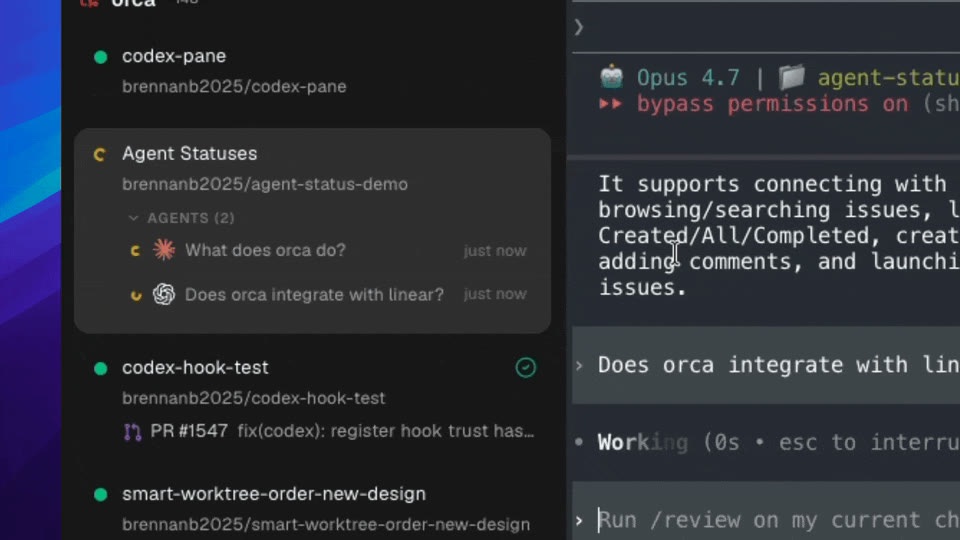
Orca's worktree cards show each agent's state, so you can see a handed-off agent at work. From onorca.dev, 30 October 2026.
Run this only in the practice project, never in this site's repo.
From snapshot/skills/orca-cli/SKILL.md, lines 24–26: “Otherwise, on Linux outside an Orca-managed terminal, use orca-ide. Never run bare orca there — outside Orca's terminals it normally resolves to the GNOME Orca screen reader (/usr/bin/orca) and starts speech on the user's machine.”
From snapshot/web/onorca.dev/docs-cli-skills.md, line 11: “Public install packages are hybrid discovery stubs: short SKILL.md files that tell the agent when to engage Orca and how to load the full guide from the running CLI.”
From snapshot/skills/orca-cli/orca-guide.md, line 33: “A handoff is done when the new worktree id and agent handle have been reported and the prompt was delivered: the launch's prompt.outcome is journaled or handed-to-terminal, or, for an agent that was already running, the send receipt reported accepted: true.”
From snapshot/skills/orca-cli/orca-guide.md, line 69: “If a launch reply is lost, use the returned operationId to re-issue the exact same command from the same directory against the same execution host with --retry-launch <operationId>.”
From snapshot/skills/orca-cli/orca-guide.md, line 35: “Do not use orca orchestration task-create, orca orchestration dispatch --inject, or orca orchestration check --wait for full handoffs.”