A pull request (PR) is a proposal on GitHub to merge the commits on one branch into another. It compares two branches:
the head branch: your work, such as a Ticket's branch;
the base branch: where it should land, usually main.
The PR is where the change gets discussed and reviewed before it's merged. Its tabs show the description, the commits, the changed files, and the Checks: automated tests and builds (see CI/CD).
A draft PR can't be merged. It shares work in progress without asking for review. Mark it "ready for review" when it's done.
Merging
Merging brings the head branch's changes into the base branch. GitHub offers three ways:
Merge commit: keeps every commit and adds one extra commit marking the merge.
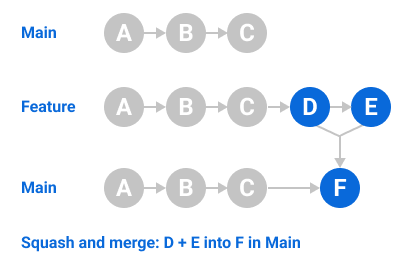
Squash and merge: combines all the PR's commits into one commit on the base branch.
Rebase and merge: adds each commit onto the base branch one by one, with no merge commit.
Closing keywords
A closing keyword in the PR description links the PR to an Issue and closes the Issue when the PR merges. Write the keyword, then # and the Issue's number:
Closes #12
Fixes #12 and Resolves #12 work too, and so do colons and capitals (CLOSES: #12). Put one keyword per Issue.
The catch: keywords only work when the PR targets the repo's default branch. In a PR into any other branch, they are ignored and nothing closes. A keyword in a commit message also closes the Issue, once that commit reaches the default branch.
Why it matters for the Flows
A closed Issue is how the Issue tracker shows a Ticket is done. So "merged into main with Closes #12" is the moment Ticket #12 counts as finished.
implement-spec merges each Ticket's branch into one shared branch for the whole Spec, not into main. Those merges close nothing. Instead it can open one draft PR from the shared branch, marked as closing the Spec and its Tickets, so they all close when that PR merges into main.
mainclosing the Spec and its Tickets
one shared branchThose merges close nothing.
each Ticket's branch
(commit counts are illustrative)
keywords only work when the PR targets the repo's default branch
Going deeper
4 min read · Going deeper not read
Why it exists
Matt's v1.3 release notes (2026-10-05) name the problem: "PRs are still the main bottleneck for work that gets to main." So the pull request is where a person reads an agent's work before it reaches main.
His pr Skill, new in v1.3, only writes the PR body: "It does not push a branch, open the PR, or decide what goes into it." The pr Lesson covers the body.
How it works underneath
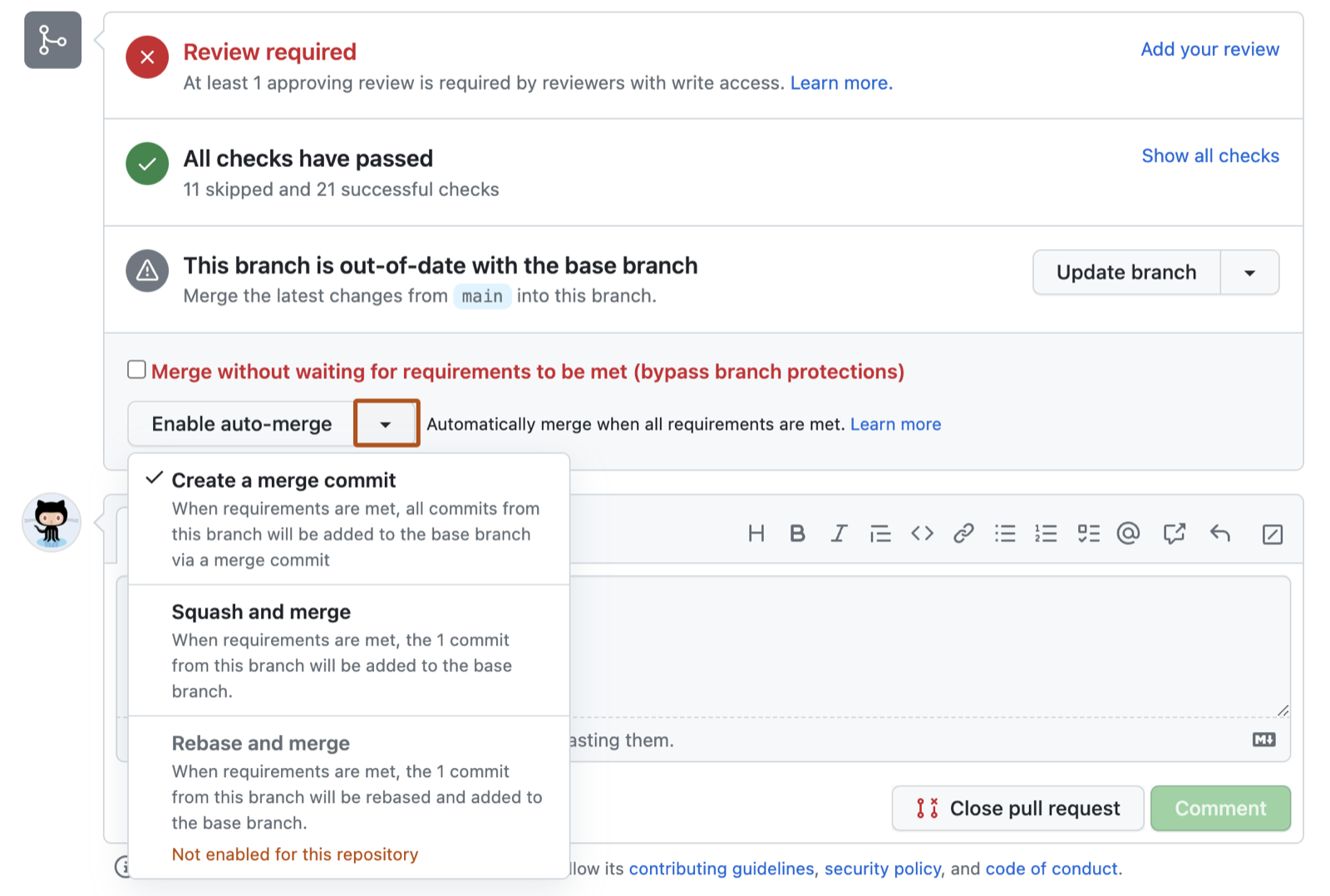
Merging on its own. GitHub's auto-merge "merges a pull request automatically after all required reviews and status checks pass." It has two preconditions.
It must be enabled for the repository first: in its Settings, under General, select Allow auto-merge. It exists for public repositories on GitHub Free, and for private ones only with GitHub Pro, GitHub Team or GitHub Enterprise.
The option only shows on a PR that can't merge yet. For example, a branch protection rule says "Require status checks to pass before merging" and the checks are still running.
The repository setting that has to be on before any PR offers Enable auto-merge. From docs.github.com, 30 October 2026.
Citations (60)
From snapshot/docs/docs.github.com/pull-requests.md, line 7: “Pull requests are proposals to merge code changes into a project. A pull request is GitHub's key collaboration feature, letting you discuss and review changes before merging them.”
Then anyone with write access clicks Enable auto-merge on that PR, then Confirm auto-merge. So you turn it on for that PR, and it merges itself when CI goes green.
The merge box of a PR, where you pick a merge method before enabling auto-merge. From docs.github.com, 30 October 2026.
enabled for the repository
a PR that can't merge yet
Enable auto-merge
it merges itself when CI goes green
So you turn it on for that PR, and it merges itself when CI goes green.
A real example
Matt's v1.3 release PR, #1120, opened on 2026-09-24, changed how implement-spec uses PRs. Its Summary shows the old goal, "a PR implementing the whole spec", becoming "the whole spec on one integration branch".
The draft PR moved too. It used to open with the branch: "open draft PR closing spec + tickets". Now it opens "only if the tracker closes work via PRs (or asked), after the first merge". Step 8 changed to match: "mark PR ready if one exists, else resolve tickets via the tracker". The PR warns that anyone who "relied on implement-spec opening a PR unconditionally sees different behaviour."
Where it goes wrong
Opening the PR too early. A user ran implement-spec end to end and filed a report on 2026-09-02 (its body was drafted by an AI agent, as its label says). It found that "gh pr create refuses a branch with no commits ahead of main", so the draft PR couldn't open when the branch was created. Matt closed the report on 2026-10-07. Today's SKILL.md, newer than the report, waits for the first merge, because "a branch with no commits ahead of main can't open one".
One big branch. Matt says of implement-spec's single branch: "The result is one big branch, and there is no good answer to that yet." The pr docs page adds that if the body is huge because the diff is huge, "the problem is the size of the PR".
Auto-merge switching itself off. GitHub's docs: "Auto-merge is disabled if someone without write permissions pushes new changes to the head branch or switches the base branch."
Squashing a branch you keep using. GitHub warns: if you keep working on a head branch after a squash merge and open a new PR between the same branches, "commits that you previously squashed and merged will be listed in the new pull request". You may also resolve the same conflicts again in each new PR. GitHub's advice: "Squash merging works best for short-lived branches."
GitHub's drawing of a squash merge: the branch's commits become one commit on main. From docs.github.com, 30 October 2026.
Try it
In your practice project (set it up first with keeping-track's Try it step if you haven't), make main wait for CI, then let a PR merge itself.
If your account is on GitHub Free, make the repo public. Free has auto-merge and protected branches only in public repos.
In the repo's Settings, under General, select Allow auto-merge.
In Settings, click Branches, then Add classic branch protection rule. Type main as the branch name pattern. Select Require status checks to pass before merging, search for your CI check and select it. Click Create.
Push one Ticket's branch and open a PR into main with Closes #<the Ticket's number>.
While the checks run, click Enable auto-merge, then Confirm auto-merge.
Watch the PR merge when CI passes, and the Ticket close.
From snapshot/docs/docs.github.com/linking-a-pull-request-to-an-issue.md, line 17: “The special keywords in a pull request description are interpreted only when the pull request targets the repository's default branch. If the pull request targets any other branch, then these keywords are ignored, no links are created, and merging the PR has no effect on the issues.”
From snapshot/skills/implement-spec/SKILL.md, line 11: “The goal is the entire spec implemented on a single integration branch, with every ticket resolved the way the issue tracker closes work.”
From snapshot/skills/implement-spec/SKILL.md, line 27: “open a draft PR after the first merge in step 5 (a branch with no commits ahead of main can't open one), marked as closing the spec and tickets.”