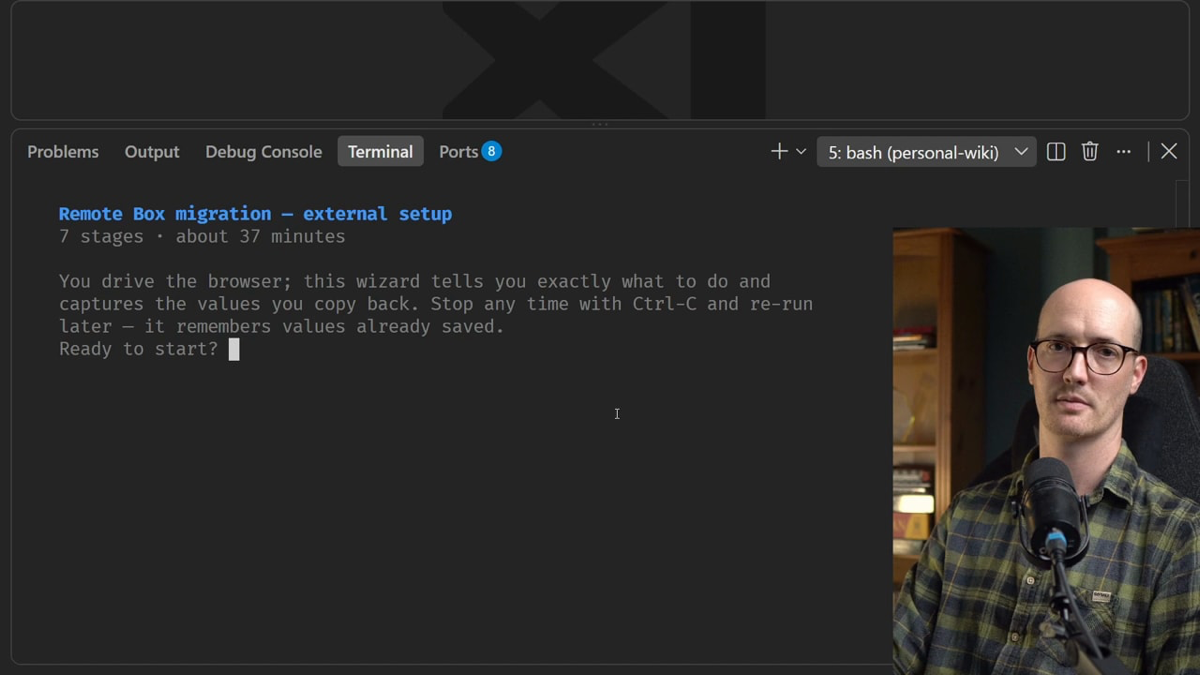
Some setup steps only a human can do: signing in to a dashboard, creating an API key, adding a secret to GitHub. A wizard is a bash script that walks you through such a procedure, one stage at a time. It opens each web page and says exactly what to click and copy. It captures the values you paste back and writes them where they belong, such as .env or GitHub secrets. It confirms at every stage and shows how many stages are left.
The Skill writes that script for you. The look and feel come from a fixed template, so the agent only works out the stages.
When to use it
getting API keys from third-party services for a new FastAPI project;
setting up the secrets your CI needs;
clicking through an unfamiliar dashboard, such as a database host's;
a one-off migration or cutover, like moving a site to a new host.
The agent can start it on its own, the moment it hits a step only you can take.
When not to use it
Don't use it for steps the agent can do itself. If the agent could just do it, it should; a wizard is only for where a human really is in the loop.
If you need knowledge from another person rather than actions in a dashboard, use to-questionnaire. It writes them questions to answer; a wizard walks someone through doing things.
What it needs to start
A manual procedure to walk through. The agent reads the repo first instead of asking you cold: .env.example, the README, docker-compose files and the CI workflows. Every secrets.* reference there is a value the wizard must produce.
Then it shows you the ordered stages and the values each one produces. You confirm, and you may add, drop or reorder stages. Where it doesn't know a dashboard's current layout, it asks you or checks the docs. It never invents steps.
What it creates
One bash script: the template, with your stages added below its STAGES marker. The agent checks it with bash -n, and with shellcheck if it's installed, and makes it runnable. It never runs it end to end itself, because the script opens browsers and waits for you. It tells you how to run it.
By default the script is for one run and is deleted when the job is done. If you want a repeatable setup path, commit it and link it from the README. Then the next person runs the script instead of asking an AI.
Going deeper
6 min read · Going deeper not read
Why it exists
Matt names the problem on his page for the Skill (updated 24 August 2026): "Before, an agent that hit a credentials wall mid-build dumped six numbered steps into the chat for you to follow by hand. Now it writes a wizard."
The fix shipped in v1.2, announced on 5 August 2026. wizard moved out of in-progress/, Matt's beta bucket, into his Engineering bucket, and became model-invoked: the agent may start it by itself. His changelog gives the reason. The agent can reach for it "the moment it hits a step only a human can perform, instead of dumping numbered instructions into the chat and hoping you follow them." It sits in Engineering rather than Productivity because it reads .env*, docker-compose*, framework config and the CI workflows to scope itself, and it writes CI secrets.
From the v1.2 launch (5 August 2026); the time display has since been removed (CHANGELOG 1.2.3). From aihero.dev, 30 October 2026.
He aims it at a second habit too: writing setup steps into a README. A wizard "Writes an executable version instead, which fails visibly when a step goes stale".
Citations (64)
From snapshot/skills/wizard/SKILL.md, line 8: “A wizard is a bash script that walks a human, step by step, through a manual procedure that's tedious to do by hand and tedious to re-explain to an AI every time. It opens each URL, says exactly what to click and copy, captures the values, writes them where they belong (.env, GitHub secrets), confirms at every stage, and shows how many stages are left.”
From snapshot/skills/wizard/SKILL.md, line 3: “Use when provisioning infrastructure, setting up credentials or CI secrets, walking an unfamiliar third-party dashboard, or running a one-off migration or cutover. Don't invoke this for steps the agent can perform itself.”
From snapshot/skills/ask-matt/SKILL.md, line 90: “Model-invoked, so the agent reaches for it the moment it hits a wall only you can pass. If the agent could just do it itself, it should; this is for where a human is genuinely in the loop.”
A program, not a list. Matt puts it this way: "A wizard is a program, not a list of instructions. The script runs each step in order and keeps the values you enter."
One library for every wizard. Everything above the STAGES marker is the same in every wizard, and "Because the library never changes, every wizard behaves the same way." The helpers do the fiddly parts:
ask_secret reads what you type without showing it;
write_env replaces a key's line in .env instead of adding a second one, and creates a new .env that only you can read;
set_secret falls back to a warning when gh isn't installed or signed in;
the closing summary lists anything you still have to do by hand.
Keys stay out of the model. You run the script, not the agent, so a key you type goes straight to .env or gh secret. In Matt's words, "The wizard is a CLI, and the model is not connected to it." That only covers values the wizard captures while it runs. A key you paste into the chat while the stages are being scoped is in the context like any other text.
The first run is the test. Because the agent only checks the script by reading it, nobody has run it before you do. Matt says so plainly: "So the first run is yours, and that run is the test."
An older idea. In 2019 Dan Slimmon described the do-nothing script: a script that encodes a manual procedure, "encapsulating each step in a function". It "feeds the user a step at a time and waits for them to complete each step manually." His case for it: "It’s now much less likely that you’ll lose your place and skip a step." And any step can later be swapped for code that does the action. Take it as the same idea, written down earlier, rather than as wizard's proven source.
A real example
The template ships one example stage, for Stripe test keys. It writes both keys to .env, but sets only the secret one as a GitHub secret:
stage "Stripe: API keys"
say "We'll grab your Stripe test keys and store them for local dev + CI."
open_url "https://dashboard.stripe.com/test/apikeys"
step "On the API keys page, copy the Publishable key (starts pk_test_)."
ask STRIPE_PUBLISHABLE_KEY "Paste the publishable key:"
step "Click 'Reveal test key' on the Secret key row, then copy it."
ask_secret STRIPE_SECRET_KEY "Paste the secret key:"
write_env STRIPE_PUBLISHABLE_KEY "$STRIPE_PUBLISHABLE_KEY"
write_env STRIPE_SECRET_KEY "$STRIPE_SECRET_KEY"
set_secret STRIPE_SECRET_KEY "$STRIPE_SECRET_KEY"   # CI needs this one
On 19 October 2026, Colin Eberhardt, CTO at Scott Logic, wrote up how he rebuilt a personal app of modest complexity from scratch with Matt's Skills. He asked his agent to "help me setup supabase and run the current codebase". The agent reached for the Skill without being asked: "This is exactly what /wizard is for — steps only you can take". So the model-invoked trigger fired as designed.
Where it goes wrong
Stale dashboard steps. Eberhardt's wizard "asked me to navigate to pages that no longer existed, or click buttons that were simply not there." His verdict: "the shell script has no escape hatch". SKILL.md tells the agent never to invent steps, yet a step the model believes is real can still be out of date. This was one user's test, on a new app, with the Skills not tailored, by his own account.
No back button. Matt's page says a wrong answer on stage 3 "means Ctrl-C and re-run". Re-running is cheap: values already in .env are offered back, so you press Enter through the stages you got right. Users asked for a way back in launch week, and the page says "it is still open".
It doesn't check the service. The wizard reads your repo, not Stripe or your host. If you created the account but never saved the key, it still sends you to the dashboard for it.
Editing the script mid-run killed it. Issue #1142, opened on 30 September 2026, explained that bash reads a script bit by bit as it runs. In one reported case, a wizard sat at its "Paste the Client ID:" prompt while its author "updated two instruction lines above that point". Pressing Enter then gave a syntax error. The fix closed the issue on 9 October 2026: every stage now runs inside one function, run_wizard, so bash reads the whole file before the first prompt. That's why today's template says to keep every stage inside run_wizard and the last line as is.
A page that's behind the code. Matt's page (updated 24 August 2026) still promises "progress with time remaining". His changelog records the time estimate being removed in version 1.2.3, a patch release after v1.2's launch, and the current SKILL.md and template (pinned 29 October 2026) count stages only. The current SKILL.md decides: progress is counted in stages.
Try it
In your practice project (set it up first with keeping-track's Try it step if you haven't):
Ask your agent for a wizard that connects the repo to Vercel for preview deploys and stores any token CI needs. Before it writes anything, check that every secrets.* reference in your CI has a stage, then run the script yourself.
From snapshot/skills/wizard/SKILL.md, lines 18–20: “Read the repo first, don't ask cold: - For setup: .env, .env.example, .env.*, README, docker-compose*, framework config, and .github/workflows/* (every secrets.* / vars.* reference is a value the wizard must produce).”
From snapshot/skills/wizard/SKILL.md, line 23: “Then show the user the ordered list of stages and the values each produces, and confirm: they may add, drop, or reorder.”
From snapshot/skills/wizard/SKILL.md, line 29: “Where you don't actually know the current UI or the exact command, say so and ask the user or check the docs: never invent steps that may not exist.”
From snapshot/skills/wizard/SKILL.md, lines 41–43: “bash -n <script>; run shellcheck if available. - chmod +x <script>. - Don't run it end-to-end yourself: it opens browsers and blocks on human input.”
From snapshot/skills/wizard/SKILL.md, line 12: “A wizard is ephemeral by default: built for one run, saved to a scratch or scripts/ path, deleted when the job's done. Commit it only when the user wants a repeatable setup path that should live in the repo.”
From snapshot/skills/wizard/SKILL.md, line 44: “If it's a repeatable setup path, commit it and link it from the README so the next person runs the script instead of asking an AI.”
From snapshot/web/aihero.dev/skills-wizard.md, line 170: “Before, an agent that hit a credentials wall mid-build dumped six numbered steps into the chat for you to follow by hand. Now it writes a wizard.”
From snapshot/web/aihero.dev/skills-wizard.md, line 133: “Everything above the STAGES marker is a fixed library, identical in every wizard and never hand-edited. Because the library never changes, every wizard behaves the same way.”
From snapshot/skills/wizard/template.sh, lines 137–139: “# write_env KEY VALUE upserts KEY='VALUE' into ENV_FILE (replaces any existing # line) and sets $KEY. Idempotent. Creates ENV_FILE at mode 0600”
From snapshot/skills/wizard/template.sh, lines 153–154: “# set_secret NAME VALUE sets a GitHub Actions repo secret via gh. Falls back # to a warning (and records it) if gh is unavailable or unauthenticated.”
From snapshot/web/aihero.dev/skills-wizard.md, line 150: “You run the script yourself, and it captures the key with hidden terminal entry and writes it straight to .env or gh secret. The wizard is a CLI, and the model is not connected to it. This holds only for values the wizard captures at runtime. If you paste a key into the chat while scoping the procedure, it's in the”
From snapshot/skills/wizard/template.sh, lines 207–217: “stage "Stripe: API keys" say "We'll grab your Stripe test keys and store them for local dev + CI." open_url "https://dashboard.stripe.com/test/apikeys" step "On the API keys page, copy the Publishable key (starts pk_test_)." ask STRIPE_PUBLISHABLE_KEY "Paste the publishable key:" step "Click 'Reveal test key' on the Secret key row, then copy it." ask_secret STRIPE_SECRET_KEY "Paste the secret key:" write_env STRIPE_PUBLISHABLE_KEY "$STRIPE_PUBLISHABLE_KEY" write_env STRIPE_SECRET_KEY "$STRIPE_SECRET_KEY" set_secret STRIPE_SECRET_KEY "$STRIPE_SECRET_KEY" # CI needs this one”
From snapshot/web/aihero.dev/skills-wizard.md, line 154: “There is no back button. The stages run forward, and a wrong answer on stage 3 means Ctrl-C and re-run. Re-running is cheap, because any value already written to .env is offered back as a default, so you press Enter through the stages you got right”
From snapshot/web/aihero.dev/skills-wizard.md, line 158: “What it doesn't do is check the third-party service. If a key exists in your .env the wizard offers it back and Enter keeps it; if you already created the Stripe account but never saved the key, the wizard still sends you to the dashboard for it.”
From snapshot/web/github.com/mattpocock-skills-issues-1142.md, line 56: “Seen for real: a generated wizard was paused at "Paste the Client ID:" while its author updated two instruction lines above that point. Pressing Enter produced line 275: syntax error near unexpected token '('”
From snapshot/skills/wizard/template.sh, lines 197–198: “# Keep every stage inside run_wizard and the last line as is: bash then parses # the whole file before the first prompt, so an edit mid-run can't break it.”
From snapshot/skills/wizard/SKILL.md, line 3: “Use when provisioning infrastructure, setting up credentials or CI secrets, walking an unfamiliar third-party dashboard”