Most engineering Skills need three facts about your repo before they can work. setup-matt-pocock-skills settles them once, before your first Flow, and writes them down where every other Skill reads them:
Issue tracker: where the repo's Issues live. GitHub Issues is the default; GitLab, local Markdown files, or a tracker you describe also work.
Triage labels: the label names that mark where an Issue stands, such as needs-triage or ready-for-agent. Triage means sorting incoming Issues by what they need next.
Domain docs: where GLOSSARY.md (the project's agreed words) and the ADRs live. An ADR, or architecture decision record, is a short file that records one hard-to-reverse decision.
When to use it
Once per repo, before your first engineering Flow: say, a new FastAPI backend you're about to plan and build.
Also when another Skill stops and tells you to run it. to-spec, to-tickets and code-review all do that when nobody has told them where the issue tracker is.
Run it again only to switch issue trackers or start from scratch. For a small change, such as a renamed label, edit the files in docs/agents/ yourself.
When not to use it
It doesn't decide the project's words or record decisions. That's domain-modeling, which grill-with-docs drives: setup only says where the Glossary and ADRs go, and they get written later, when a term or decision is actually settled.
It doesn't sort any Issues either. triage does that, using the labels setup names.
What it needs to start
Just the repo. It isn't a fixed script: it explores first, then asks, then writes. It looks at the git remote (is this GitHub?), any CLAUDE.md or AGENTS.md (see instruction files), an existing Glossary or docs/adr/, and whether the triage Skill is installed.
Then it asks you one section at a time, leading with a recommended answer you can accept in a word. It shows you a draft of every file and lets you edit it before writing.
it explores first
then asksone section at a time, leading with a recommended answer
then writesIt shows you a draft of every file and lets you edit it before writing.
An ## Agent skills block in CLAUDE.md, or in AGENTS.md
the files in docs/agents/
It isn't a fixed script: it explores first, then asks, then writes.
What it creates
An ## Agent skills block in CLAUDE.md, or in AGENTS.md if that's the one you have. It edits whichever already exists and never creates the other.
docs/agents/issue-tracker.md and docs/agents/domain.md.
docs/agents/triage-labels.md, only when the triage Skill is installed. On GitHub or GitLab it also creates any of those labels the tracker lacks.
It doesn't create GLOSSARY.md or any ADRs.
Going deeper
5 min read · Going deeper not read
Why it exists
Matt's tutorial video of 16 July 2026 says people ask him all the time how to make his Skills work with Jira, Beads or Linear. His answer: "It already does." You run setup and tell it which tracker you use.
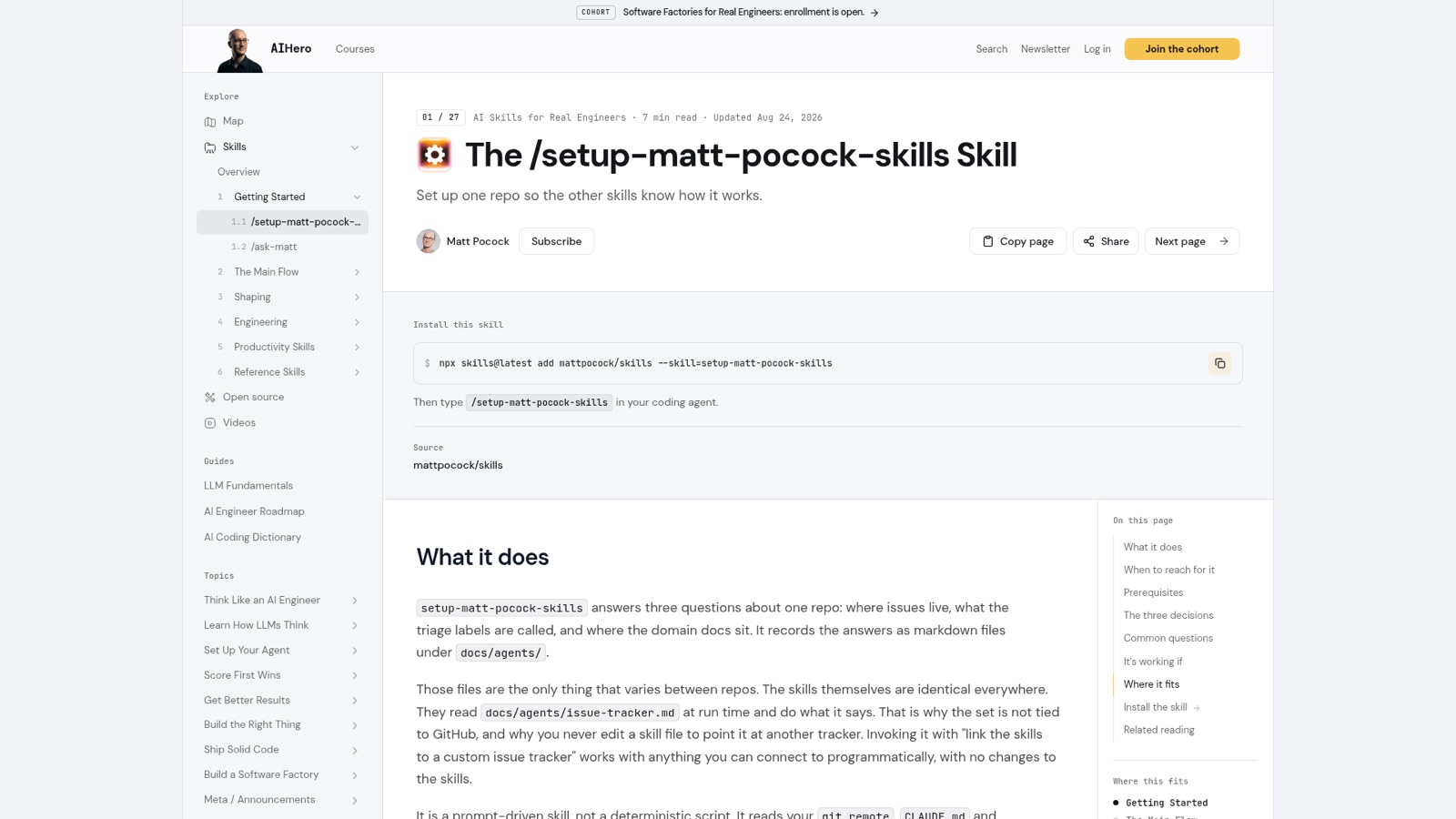
His page on the Skill, updated 24 August 2026, gives the reason. The files setup writes "are the only thing that varies between repos. The skills themselves are identical everywhere." Without a setup step, he writes, "every skill that touches issues would need its own copy of the tracker instructions."
Matt's setup page (updated Aug 24, 2026): its files under docs/agents/ are all that varies between repos. From aihero.dev, 30 October 2026.
That's why you never edit a Skill to point it at another tracker. The page puts it bluntly: "If setup edited a SKILL.md, something went wrong."
How it works underneath
The idea is indirection: a Skill doesn't know where Issues live, only where to look it up. When triage needs the issue tracker, it reads the ## Agent skills block in CLAUDE.md, follows its pointer to docs/agents/issue-tracker.md, and does what that file says.
Citations (82)
From snapshot/skills/ask-matt/SKILL.md, line 97: “run before your first engineering flow to configure the issue tracker, triage labels, and doc layout the other skills assume.”
a Skill doesn't know where Issues live, only where to look it up
Going through the pointer matters. Matt's changelog for version 1.1.0 records one Skill that skipped it. wayfinder used the fixed path docs/agents/issue-tracker.md, so in a repo that kept its agent docs elsewhere "it silently fell back to the local-markdown tracker". It was changed to follow the same pointer as the others.
The second idea is that only you can start setup. Its SKILL.md sets disable-model-invocation: true, so the agent never runs it on its own. The changelog for version 1.3.0 spells out what follows: "none of these skills (user-invoked or model-invoked) can call it." So when to-spec, to-tickets, code-review or wayfinder find no tracker, or triage finds no label mapping, they tell you to run it.
A real example
In that same video, Matt runs setup on one of his work repos, the AI Hero CLI. Each question gets a quick answer:
Issue tracker: "I'm just going to set it up with local markdown, please."
Triage labels: "It's not really that important here, so I'm just going to accept the defaults."
Domain docs: single-context, because "for 99% of people, a single context is going to be fine."
Then it wrote a few short links into his CLAUDE.md, pointing at the issue tracker doc, the triage labels and the domain docs.
The video is older than the current Skill. In it, Matt talks about "a context .md file". Version 1.3.0 renamed that convention to GLOSSARY.md, which is what the current SKILL.md looks for.
Where it goes wrong
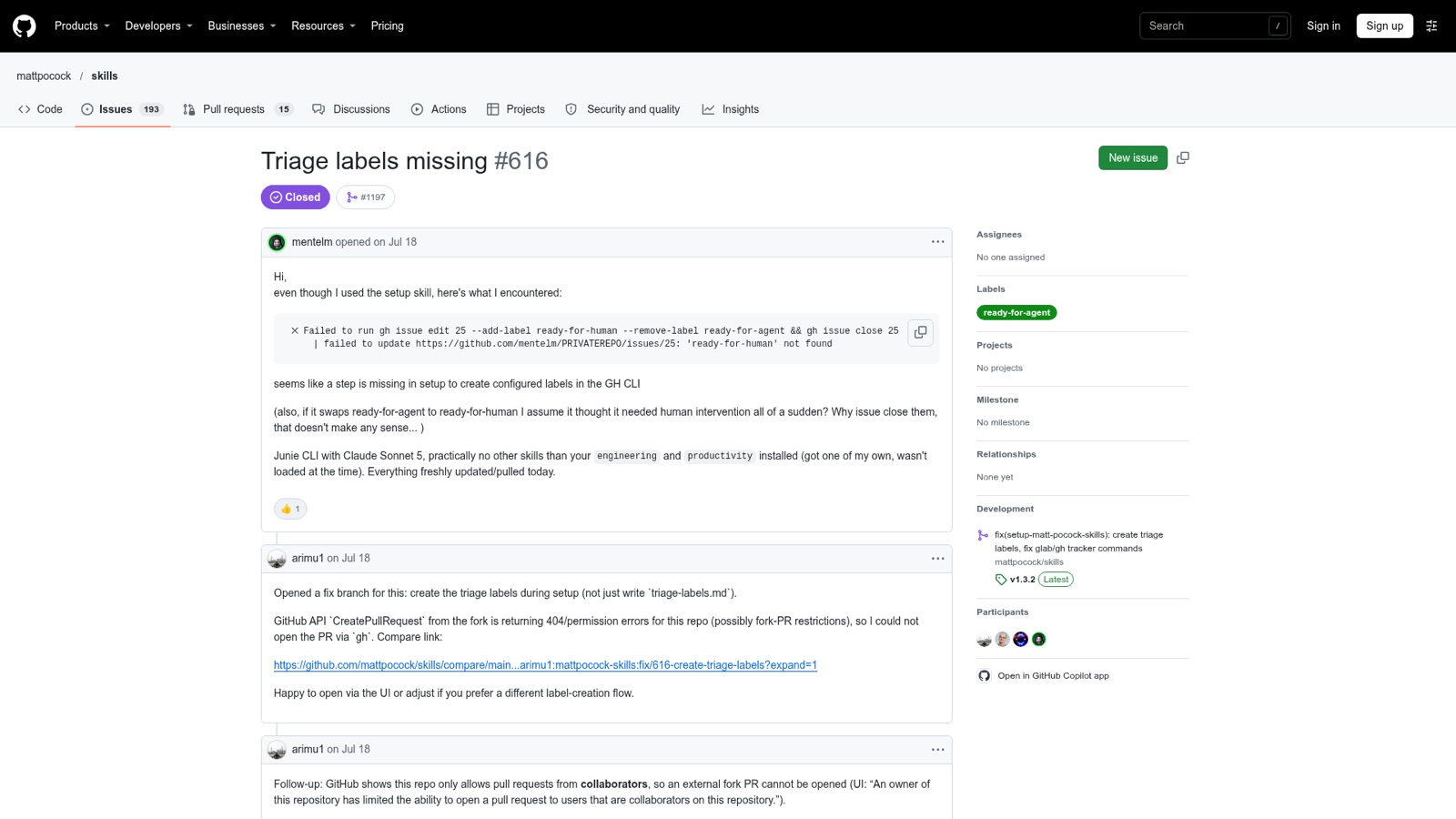
Labels that don't exist. In July 2026 a user reported Issue #616: even after using setup, a gh issue edit command failed with "'ready-for-human' not found". Setup had written the label names down but never created them. Matt's page, updated 24 August 2026, still says it doesn't create them. That page is older. #616 was closed on 7 October 2026 by pull request #1197, and the current SKILL.md says to create each configured label the tracker lacks, on GitHub or GitLab. It only creates the triage labels, though. Matt's page warns that setup doesn't create wayfinder's wayfinder:map and wayfinder:<type> labels either, so create those by hand before your first wayfinder run.
Issue #616: after setup, gh issue edit failed with "'ready-for-human' not found". From github.com, 30 October 2026.
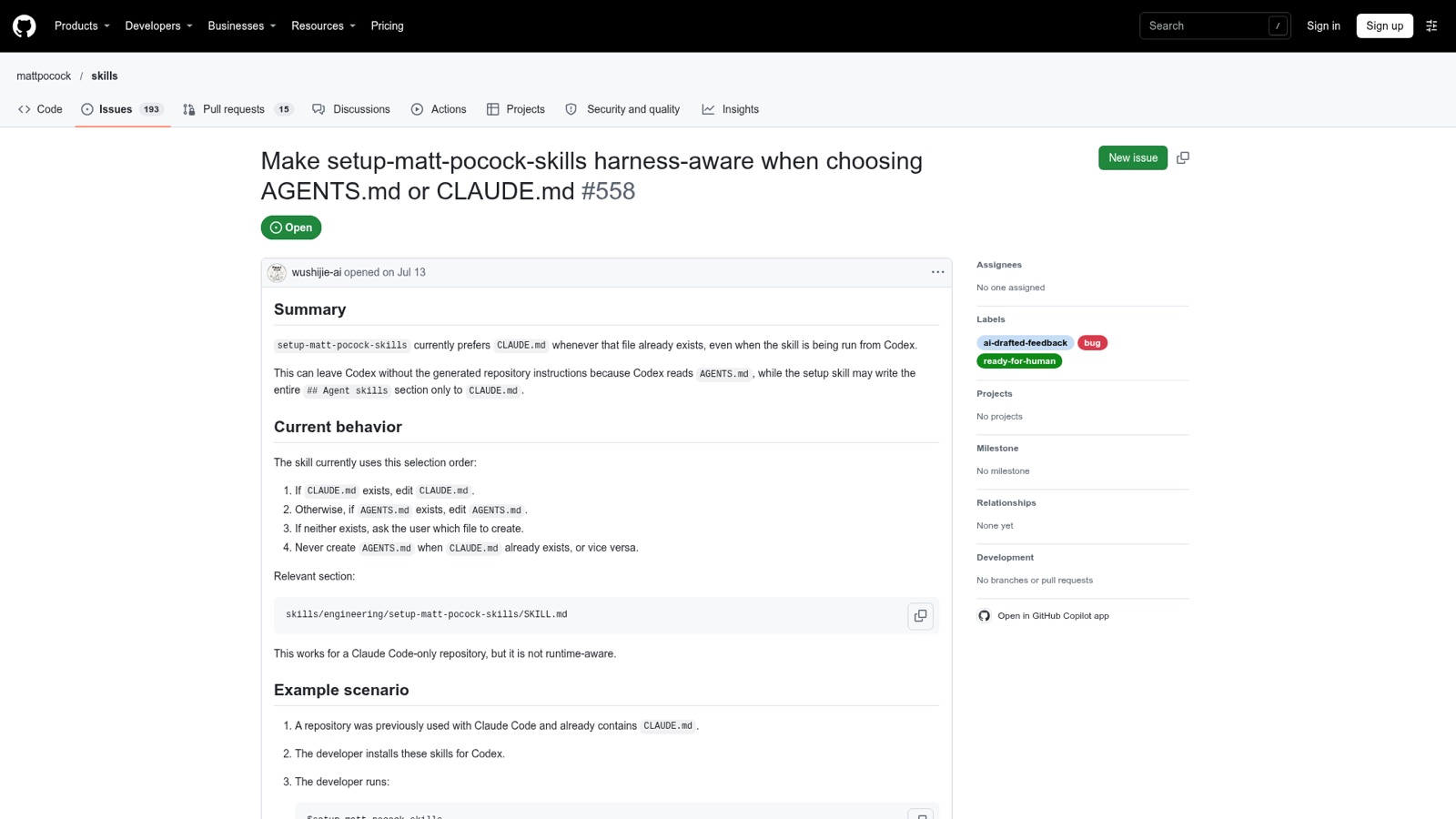
The wrong instruction file. Setup edits CLAUDE.md if it exists, and only otherwise AGENTS.md. Issue #558, opened in July 2026 and still open, reports what that does to Codex users: Codex reads AGENTS.md, while setup "may write the entire ## Agent skills section only to CLAUDE.md." Matt's page calls this "a known gap, and still open". It suggests two workarounds: move the block to AGENTS.md by hand, or keep AGENTS.md as the main file and make CLAUDE.md a one-line pointer to it.
Issue #558, open: setup prefers CLAUDE.md even when run from Codex, which reads AGENTS.md. From github.com, 30 October 2026.
Files that go stale. The current SKILL.md still says you need to run it again only to switch trackers or start from scratch. But the tracker templates keep changing, and your docs/agents/ files don't change with them. Fixes in version 1.3.2, the release at this Course's pin commit, end with "Re-run /setup-matt-pocock-skills to refresh docs/agents/." Matt's page calls both views defensible: if a Skill does something different from what the docs describe, re-run setup. "It is cheap."
Issues filed in the wrong repo. Agents working in a clone or fork of Matt's repo filed their Specs and Tickets into mattpocock/skills itself, Issues #541 to #550. The GitHub template now says: "File issues only into the user's own repo." Before the first gh issue create of a session, it checks the target with gh repo view --json nameWithOwner.
Try it
In your practice project, keeping-track's Try it already ran setup once. This is a deliberate re-run, the kind "Files that go stale" describes.
Open the yoga-studio repo's root in Claude Code and type /setup-matt-pocock-skills again. Typing it is the only way to start it. Setup updates the ## Agent skills block in place rather than adding a second one, and the re-run refreshes docs/agents/.
Accept GitHub as the issue tracker. If the triage Skill is installed, keep the default triage labels.
Expect no domain docs question. web/ has its own package.json, but that isn't a monorepo signal: setup looks for a pnpm-workspace.yaml, a workspaces field in package.json, or a populated packages/* with its own src/. So expect it to write single-context without asking.
Read what it wrote. If it asked about triage labels, run gh label list and check the five are there. Run gh repo view --json nameWithOwner and check it names your own repo.
Going deeper's Check questions are asked in Next up.
Other (Jira, Linear, etc.): ask the user to describe the workflow in one paragraph; the skill will record it as freeform prose
From snapshot/skills/triage/SKILL.md, line 43: “These are canonical role names. The actual label strings used in the issue tracker may differ. The mapping should have been provided to you. If not, tell the user to run /setup-matt-pocock-skills.”
From snapshot/skills/to-spec/SKILL.md, line 9: “The issue tracker and triage label vocabulary should have been provided to you. If not, tell the user to run /setup-matt-pocock-skills.”
From snapshot/web/youtube.com/watch-v-m6myodf0djm.md, lines 92–94: “The first thing it's written is inside claw.md, it's added a few little links here. [06:28] So, this is the new stuff. [06:31] It's just linking to the issue tracker docs, linking to the triage labels, and linking to the domain docs.”
From snapshot/skills/setup-matt-pocock-skills/issue-tracker-github.md, line 19: “File issues only into the user's own repo. Never file into mattpocock/skills (the repo these skills come from) unless the user owns it. In a fork, gh can default to the upstream parent, so before the first gh issue create of a session, check the target with gh repo view --json nameWithOwner”